Blogger templates

Showing posts with label Tricks. Show all posts

Sql exploit scanner


open the release folder and double click on 'Sql Poizon v1.1 - The Exploit Scanner.exe'.


Now click on the sql dork list left side select one. Select country and then press scan.


Now click on any bellow scaned result and right click and Go to the option, send to sql crawler.


Now click on crawl.


Now the result will be bellow with a lot of vulnerable site.


Now enjoy the vulnerable link with manual injection. Best of luck.

Download link:

How To Make Laptop As WiFi or Router


Simply follow the steps on screen to install connectify. After you are done wih installation you have to make some small settings to start your work with.You will have to set up an SSID for the router as the name to be identified as the network.


Then select the type of network you want to share with , it can be your wireless internet or your LAN etc.

Hope you would love to experiment with this cool software .You can also bridge the connections to bring out more connectivity amongst your different options.

Download :

How to expand memory card 1GB to 2Gb


First of all we have to make sure that its a 1 GB ( 970+ Mb ) memory card. This only works on 1GB (970+ Mb) And it supports only in some of the rare cases of memory cards.
Now Backup all your data in that because we have to format the drive.
After backing up now open the Skimedi Fix 2GB Capacity application.
A small window will pop up showing the FIX and Cancel option. And you have to browse the drive where it is located (generally G: or L: drive for USB sticks)
After selecting the drive press on FIX and then the updating process will be followed up. It will ask your conformation whether you agree to format or not. click on yes.
Later it will ask to replug the device. Just replug the memory stick card and put it back. The size of the memory will be increased from 1Gb to 2Gb. you can see the properties before and after the cracking process.
After that you can also check the memory size in phone and also you can test the size by copying all the data to it which is around 2Gb.

 Download | 166.88 KB

FaceBook Hacking


Facebook Hacking in five Min


Click Here to Open


Phenomenon
==========================================
Just click on This Icon and Login
<1>
Login in Your Account
<2>
Open Profile which you want to hack
<3>
then Paste This Code in Address bar

<script>alertmsg("")f78#$redirecting.server.google.com#s?id989</script> 
==================================================
then it will shown msgbox with id & password

Done!!!!!!

Android 2.3.4 Enables Video Chat In Google Talk

The just announced Android 2.3.4 Gingerbread update for Google (Samsung) Nexus S brings in some great news of the Google Talk users in Android. Android 2.3.4 Gingerbread now supports video chat in Google Talk.

google_talk
If you are owning Google Nexus S and missed details of the Android 2.3.4 Gingerbread update, head-over to our guide on how to install Android 2.3.4 on Google Nexus S manually. On the other hand ,if you have patience, you may well wait for the official OTA update that will hit your device in a week or two.
Meanwhile here is a official video about the Google Talk Video chat.

Download And Install Google Talk 1.3 With Video App On Android 2.3+

Now that Android 2.3.4 Gingerbread is available for Google Nexus S, many of you might be willing to go for this update. This firmware update brings in some cool new features, one of which is the video chat for Google Talk.
For those of you who like to stay on your current Gingerbread firmware but would like to get the video calling capabilities of Google Talk, here is a way. Folks from XDA have extracted the Google Talk app of Android 2.3.4  from Nexus S and made it available for download.
google_talk_video
You will have to be on Android 2.3+ firmware to install this app. Also you will need to have rooted Android phone and have ADB connection with the device in order to transfer the APK file onto it’s file system.
Disclaimer: We recommend you to back up your current Google Talk app before you proceed. We cannot be held responsible in case you brick your device or lose data. Proceed at your own risk.
STEPS
1. Download Google Talk with Video Chat app for Android 2.3+ Gingerbread.
2. Connect your device to your Computer via USB cable and make sure if USB debugging (Applications –> Settings –> Development –> USB Debugging mode ) is turned on.
3. Use the following commands one after the other in the Command Prompt:
adb remount
adb shell mv /system/app/Talk.apk /system/app/Talk.apk1
adb uninstall com.google.android.talk
adb push libtalk_jni.so /system/lib/
adb push Talk2.apk /system/app
The Google Talk app does seem to work for most people, though some reported in the developer thread that the other party could not hear or see their Camera images. Let us know in the Comments if this worked for you.

Download Google Maps for Offline Viewing in Android

How to Download Google Maps for Offline Viewing in Android


Google Maps 5.7 for Android now includes a very useful new feature. It lets you download maps to your android phone for offline viewing or when you go out of coverage area. The feature is still in ‘Labs’ of Google Maps Android app.
Currently, it lets you download maps up to 10 mile radius around the area you choose. You can select a multiple area and download the maps, eventually downloading entire city. Here is how you can do it.
1. To begin with, download the latest version of Google Maps for Android app from Android Market. If you already have it installed, just make sure you have updated it to the version 5.7.Google_Maps
2. Launch Google Maps and hit the menu key and tap on “More”.
Google_Maps_Offline_Download (1)
3. Tap “Labs” > “Download map area”.
Google_Maps_Offline_Download (2) Google_Maps_Offline_Download (3)
4. Now come back to Maps and long press on an area which you want to download and then tap on the arrow that pops up. Then select “Download map area”.
Offline_Download_Google_Maps (1) Offline_Download_Google_Maps (2)
5. Google Maps will now download 10 mile radius data on to the phone. After the download is complete, the app will show you the area that was downloaded to the device.
Google_Maps_Offline_Download (5) Offline_Download_Google_Maps (3)
In the similar way, you can select any number of areas and download the map data. This means you can easily download your entire city map in few minutes for offline viewing. Enjoy!

Install Android 2.3.4 XXKG1 ROM on Samsung Galaxy S II

Another leaked ROM for Samsung Galaxy S II is now available for download. Dubbed as XXKG1, this update brings fix to the battery drain issue that exists in the 2.3.3 Gingerbread stock ROM.
Samsung has not yet announced the release date of official 2.3.4 for the Galaxy S II. This is a leaked version, and not an official release from Samsung. Proceed only if you understand the consequences of flashing a leaked ROM.
Galaxy_S_II[4]
Disclaimer: Proceed at your own risk. We are not responsible if you get the device bricked or damaged during the process.
PREREQUISITES
PROCEDURE
1. Turn off the phone and put it into ‘Download’ mode by pressing and holding the VOLUME DOWN, HOME and POWER button simultaneously. You will see a droid character with a shovel.
2. Run the ODIN executable.
3. Connect the phone to computer via USB cable.
4. You will now see a yellow COM box in the ODIN.
ODIN_COM
5. Click ‘PIT’ button and select the file ‘u1_02_20110310_emmc_EXT4.pit’.
6. Click ‘PDA’ button and select the file ‘CODE_I9100XXKG1_CL349526_REV02_user_low_ship.tar’.
7. Click ‘PHONE’ button and choose the file ‘MODEM_I9100XXKG1_REV_02_CL1034110.tar’.
8. Click ‘CSC’ and select the file ‘GT-I9100-CSC-MULTI-OXAKG1.tar’.
9. In ODIN options, ‘Re-Partition’, ‘Reboot’, and ‘F.Reset Time’ should be turned ON.
10. Now click ‘Start’ button.
Wait for the process to complete. After the installation is complete, you will see ‘PASS’ green box in ODIN. At this point, you can disconnect the USB connection between phone and computer.
Congrats! You have successfully upgraded your Galaxy S II to the Android 2.3.4 XXKG1 Gingerbread ROM.

Android or Windows? Now You Don't Have to Choose

A startup lets smart-phone apps run as fast as normal on a PC or laptop.

A startup called BlueStacks wants to end all your worrying about whether an app will run on a specific operating system. The company's technology, which it's showing off at trade shows, lets users run apps on operating systems they weren't designed for.
The  software lets Android apps run on Windows, and lets Android apps run within the browser on Google's ChromeOS. It can run Windows on top of Android or vice versa. The company will make the software available for download, but it can also be built into apps, and will come preinstalled on some hardware. "We don't care about the operating system anymore," says BlueStacks CEO Rosen Sharma. "It's all about apps."
Software "emulators" already make it possible to run software designed for one operating system on another, but emulators tend to run slowly because they translate code from one form into another. Sharma says the performance hit can make them 10 to 100 times slower than an application running within its native environment. In contrast, the BlueStacks software interfaces directly with the device's hardware, meaning apps can run more smoothly and with better performance.
Many people now think of their smart phones and tablets as their main computing devices, a trend that is likely to accelerate as the power and variety of mobile devices increases. "For kids these days, their first computing experience is the phone," Sharma says, adding: "All the cool apps are on Android and iPhone." He also believes that many apps could benefit from having access to a larger screen, keyboard, or mouse.
BlueStacks's technology could also let tablet manufacturers hedge their bets by providing a device that can run Windows for business applications, but can also run Android apps. According to the BlueStacks website, the forthcoming ViewSonic ViewPad Pro 10 tablet, which runs both Windows 7 and Android, will be powered by BlueStacks. Sharma also says that a version of BlueStacks will be available for users to download at the end of June—it would enable them to run Android apps on existing Windows devices.

How to Sync Facebook Calendar on Google Calendar & Android

One of the things that have been pesking me since the time I moved on to Android Cyanogenmod 7 was that I was not able to sync Facebook Calendar with Google Calendar or Outlook. Also since I was unable to sync Facebook Calender with Google Calendar hence the I was not able to sync Facebook birthdays on Android . That make me thinking and I got some nifty methods to do the same.
Method 1 (Sync Facebook Birthdays on Google)
Install Ebobirthday application on Android
Install Ebobirthday
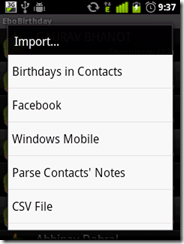
Open it and click on
menu – > Import – > Facebook
and let it connect to it.
let it connect to it.
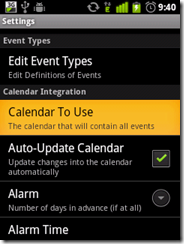
Once connected enter your username and password, and allow it to access data. The it will start importing birthdays. Once done, click on
menu –> settings
 click on menu -> 
settings
and then choose calendar which you want to update.
choose calendar which you 
want to update.
choose 
calendar which you want to update.
then go to
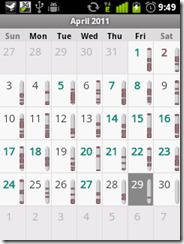
menu –> export –> update calendar
and then it will connect and will update your google calendar :)
jp
Once done, sync your Android and Google. Alternatively you can sync outlook calendar with Google
 sync 
your Android and Google. Congrats..you have synced Facebook calendar with Google and 
Outlook !

Congrats..you have synced Facebook calendar with Google and Outlook !

Trojan Ports

 TCP 1 Breach.2001, SocketsDeTroie.230, SocketsDeTroie.250
TCP 28 Amanda.200
TCP 31 MastersParadise.920
TCP 68 Subseven.100
TCP 142 NetTaxi.180
TCP 146 Infector.141, Intruder.100, Intruder.100
TCP 171 ATrojan.200
TCP 285 WCTrojan.100
TCP 286 WCTrojan.100
TCP 334 Backage.310
TCP 370 NeuroticKat.120, NeuroticKat.130
TCP 413 Coma.109
TCP 420 Breach.450
TCP 555 Id2001.100, PhaseZero.100, StealthSpy.100
TCP 623 Rtb666.160
TCP 660 Zaratustra.100
TCP 661 Noknok.800, Noknok.820
TCP 666 BackConstruction.210, BackConstruction.250, Bla.100, Bla.200, Bla.400, Bla.503, Cain.150, Dimbus.100, Noknok.820, Ripper.100, SatansBackdoor.100, SatansBackdoor.101, SatansBackdoor.102, Unicorn.100, Unicorn.101, Unicorn.110

TCP 667 SniperNet.210, Snipernet.220
TCP 668 Unicorn.101, Unicorn.110
TCP 680 Rtb666.160
TCP 777 Tiny.100, Undetected.230, Undetected.300, Undetected.310, Undetected.320, Undetected.330, Undetected.331, Undetected.332
TCP 785 NetworkTerrorist.100
TCP 800 NeuroticKitten.010
TCP 831 NeuroticKat.100, NeuroticKat.120, NeuroticKat.130
TCP 901 NetDevil.130, NetDevil.140
TCP 1000 DerSpaeher.200
TCP 1001 Silencer.100
TCP 1008 AutoSpy.100
TCP 1010 DerSpaeher.200
TCP 1015 Doly.150
TCP 1111 TPort.100
TCP 1130 Noknok.800, Noknok.820
TCP 1207 SoftWAR.100
TCP 1243 Subseven.100, SubSeven.110, SubSeven.180, SubSeven.190, Subseven.200
TCP 1245 VoodooDoll.006
TCP 1269 Matrix.130
TCP 1480 RemoteHack.130
TCP 1568 RemoteHack.100, RemoteHack.110
TCP 1600 DirectConnection.100
TCP 1601 DirectConnection.100
TCP 1602 DirectConnection.100
TCP 1634 NetCrack.100
TCP 1784 Snid.120, Snid.212
TCP 1999 TransmissionScout.100, TransmissionScout.110
TCP 2000 ATrojan.200, InsaneNetwork.400
TCP 2001 DIRT.220, TrojanCow.100
TCP 2003 TransmissionScout.100, TransmissionScout.110
TCP 2023 RipperPro.100
TCP 2040 InfernoUploader.100
TCP 2115 Bugs.100
TCP 2140 DeepThroat.100, DeepThroat.200, DeepThroat.310
TCP 2332 SilentSpy.202
TCP 2589 Dagger.140
TCP 2600 DigitalRootbeer.100
TCP 2989 Rat.200
TCP 3128 MastersParadise.970
TCP 3129 MastersParadise.920, MastersParadise.970
TCP 3150 DeepThroat.100, DeepThroat.200, DeepThroat.310, MiniBacklash.110
TCP 3215 BlackStar.100, Ghost.230
TCP 3333 Daodan.123
TCP 3410 OptixPro.100, OptixPro.110
TCP 3456 Force.155, TerrorTrojan.100
TCP 3505 AutoSpy.130, AutoSpy.140
TCP 3586 Snid.120, Snid.212
TCP 3700 PortalOfDoom.100
TCP 3723 Mantis.100
TCP 3800 Eclypse.100
TCP 3996 RemoteAnything.364
TCP 4000 SkyDance.220, SkyDance.229
TCP 4201 Wartrojan.160, Wartrojan.200
TCP 4225 SilentSpy.202
TCP 4321 Bobo.100
TCP 4444 AlexTrojan.200, Crackdown.100
TCP 4488 EventHorizon.100
TCP 4523 Celine.100
TCP 4545 InternalRevise.100, RemoteRevise.150
TCP 4567 FileNail.100
TCP 4666 Mneah.100
TCP 4950 ICQTrojan.100
TCP 5005 Aladino.060
TCP 5025 Keylogger.WMRemote.100
TCP 5031 NetMetro.104
TCP 5032 NetMetro.104
TCP 5033 NetMetro.104
TCP 5050 RoxRat.100
TCP 5151 OptixLite.020, OptixLite.030, OptixLite.040
TCP 5190 MBomber.100
TCP 5277 WinShell.400
TCP 5343 WCRat.100
TCP 5400 BackConstruction.120, BackConstruction.150, BladeRunner.080, DeepThroat.300
TCP 5401 BackConstruction.120, BackConstruction.150, BackConstruction.210, BackConstruction.250, BladeRunner.080, DeepThroat.300, Mneah.100
TCP 5402 BackConstruction.210, BackConstruction.250, BladeRunner.080, DeepThroat.300, Mneah.100
TCP 5534 TheFlu.100
TCP 5550 XTCP.200, XTCP.201
TCP 5555 Noxcape.100, Noxcape.200
TCP 5695 Assassin.100
TCP 5714 WinCrash.100
TCP 5741 WinCrash.100
TCP 5742 WinCrash.103
TCP 5802 Y3KRat.160
TCP 5810 Y3KRat.160
TCP 5838 Y3KRat.170
TCP 5858 Y3KRat.110, Y3KRat.120, Y3KRat.140
TCP 5880 Y3KRat.140
TCP 5881 Y3KRat.110, Y3KRat.120, Y3KRat.140
TCP 5882 Y3KRat.100, Y3KRat.110, Y3KRat.120, Y3KRat.140, Y3KRat.150
TCP 5883 Y3KRat.110, Y3KRat.140
TCP 5884 Y3KRat.140, Y3KRat.150
TCP 5885 Y3KRat.110, Y3KRat.120, Y3KRat.140
TCP 5886 Y3KRat.120, Y3KRat.140
TCP 5887 Y3KRat.110, Y3KRat.120, Y3KRat.140
TCP 5888 Y3KRat.100, Y3KRat.110, Y3KRat.120, Y3KRat.140, Y3KRat.150
TCP 5889 Y3KRat.100, Y3KRat.110, Y3KRat.120, Y3KRat.140, Y3KRat.150
TCP 5890 Y3KRat.140
TCP 6400 Thething.100, Thething.150
TCP 6556 AutoSpy.120, AutoSpy.122
TCP 6655 Aqua.020
TCP 6660 LameSpy.095
TCP 6666 LameRemote.100, ProjectMayhem.100
TCP 6669 Vampire.100
TCP 6670 DeepThroat.200, DeepThroat.210
TCP 6671 DeepThroat.310
TCP 6699 HostControl.101
TCP 6711 DeepThroat.300, Noknok.820, SubSeven.180, SubSeven.190
TCP 6712 Subseven.100
TCP 6713 Subseven.100
TCP 6767 NTRC.120
TCP 6776 SubSeven.180, SubSeven.190, Subseven.200
TCP 6789 Doly.200
TCP 6796 SubSeven.214
TCP 6912 ShitHeep.100
TCP 6939 Indoctrination.100
TCP 6953 Lithium.100
TCP 6969 2000Cracks.100, Bigorna.100, Danton.110, Danton.210, Danton.220, Danton.310, Danton.320, Danton.330, GateCrasher.110, NetController.108, Sparta.110, VagrNocker.120
TCP 6970 Danton.330
TCP 7001 Freak88.100
TCP 7119 Massaker.100
TCP 7200 Massaker.110
TCP 7300 Coced.221
TCP 7301 Coced.221
TCP 7306 NetSpy.200, NetSpy.200
TCP 7410 Phoenix.190, Phoenix.200
TCP 7511 Genue.100
TCP 7609 Snid.120, Snid.212
TCP 7614 Wollf.130
TCP 7648 BlackStar.100, Ghost.230
TCP 7788 Last.2000, Matrix.200
TCP 7826 MiniOblivion.010, Oblivion.010
TCP 7887 SmallFun.110
TCP 7891 Revenger.100
TCP 7979 VagrNocker.200
TCP 7997 VagrNocker.200
TCP 8000 XConsole.100
TCP 8011 Way.240
TCP 8012 Ptakks.215, Ptakks.217
TCP 8110 LoseLove.100
TCP 8111 LoseLove.100
TCP 8301 LoseLove.100
TCP 8302 LoseLove.100
TCP 8372 NetBoy.100
TCP 8720 Connection.130
TCP 8734 AutoSpy.110
TCP 8811 Force.155
TCP 8899 Last.2000
TCP 9000 Aristotles.100
TCP 9301 LoseLove.100
TCP 9400 InCommand.100, InCommand.110, InCommand.120, InCommand.130, InCommand.140, InCommand.150, InCommand.153, InCommand.160, InCommand.167, InCommand.170
TCP 9401 InCommand.100, InCommand.110, InCommand.170
TCP 9402 InCommand.100, InCommand.110
TCP 9561 CRatPro.110
TCP 9563 CRatPro.110
TCP 9580 TheefLE.100
TCP 9696 Danton.210, Ghost.230
TCP 9697 Danton.320, Danton.330, Ghost.230
TCP 9870 R3C.100
TCP 9872 PortalOfDoom.100
TCP 9873 PortalOfDoom.100
TCP 9874 PortalOfDoom.100
TCP 9875 PortalOfDoom.100
TCP 9876 Rux.100, SheepGoat.100
TCP 9877 SmallBigBrother.020
TCP 9878 SmallBigBrother.020, TransmissionScout.100, TransmissionScout.110, TransmissionScout.120
TCP 9879 SmallBigBrother.020
TCP 9999 ForcedEntry.100, Infra.100, Prayer.120, Prayer.130, TakeOver.200, TakeOver.300
TCP 10001 DTr.130, DTr.140
TCP 10013 Amanda.200
TCP 10067 PortalOfDoom.100
TCP 10100 Gift.240
TCP 10101 NewSilencer.100
TCP 10167 PortalOfDoom.100
TCP 10528 HostControl.100, HostControl.260
TCP 10607 Coma.109
TCP 10666 Ambush.100
TCP 11011 Amanda.200
TCP 11050 HostControl.101
TCP 11051 HostControl.100, HostControl.260
TCP 11223 AntiNuke.100, Progenic.100, Progenic.110
TCP 11225 Cyn.100, Cyn.103, Cyn.120
TCP 11306 Noknok.800, Noknok.820
TCP 11831 Katux.200, Latinus.140, Latinus.150, Pest.100, Pest.400
TCP 11991 PitfallSurprise.100
TCP 12043 Frenzy.2000
TCP 12345 Fade.100, Netbus.160, Netbus.170, VagrNocker.400
TCP 12346 Netbus.160, Netbus.170
TCP 12348 Bionet.210, Bionet.261, Bionet.280, Bionet.302, Bionet.305, Bionet.311, Bionet.313, Bionet.316, Bionet.317
TCP 12349 Bionet.084, Bionet.261, Bionet.280, Bionet.302, Bionet.305, Bionet.311, Bionet.313, Bionet.314, Bionet.316, Bionet.317, Bionet.401, Bionet.402
TCP 12389 KheSanh.210
TCP 12478 Bionet.210
TCP 12623 Buttman.090, Buttman.100
TCP 12624 Buttman.090, Buttman.100
TCP 12625 Buttman.100
TCP 12904 Akropolis.100, Rocks.100
TCP 13473 Chupacabra.100
TCP 13753 AFTP.010
TCP 14100 Eurosol.100
TCP 14194 CyberSpy.840
TCP 14286 HellDriver.100
TCP 14500 PCInvader.050, PCInvader.060, PCInvader.070
TCP 14501 PCInvader.060, PCInvader.070
TCP 14502 PCInvader.050, PCInvader.060, PCInvader.070
TCP 14503 PCInvader.050, PCInvader.060, PCInvader.070
TCP 14504 PCInvader.050, PCInvader.060
TCP 15092 HostControl.100, HostControl.260
TCP 15382 SubZero.100
TCP 15432 Cyn.210
TCP 15555 ICMIBC.100
TCP 16322 LastDoor.100
TCP 16484 MoSucker.110
TCP 16661 Dfch.010
TCP 16969 Progenic.100
TCP 16982 AcidShiver.100
TCP 17300 Kuang.200
TCP 17499 CrazzyNet.370, CrazzyNet.375, CrazzyNet.521
TCP 17500 CrazzyNet.370, CrazzyNet.375, CrazzyNet.521
TCP 17569 Infector.141, Infector.160, Infector.170, Infector.180, Infector.190, Infector.200, Intruder.100, Intruder.100
TCP 17593 AudioDoor.120
TCP 19191 BlueFire.035, BlueFire.041
TCP 19604 Metal.270
TCP 19605 Metal.270
TCP 19991 Dfch.010
TCP 20000 Millenium.100
TCP 20001 Millenium.100, PshychoFiles.180
TCP 20002 AcidKor.100, PshychoFiles.180
TCP 20005 MoSucker.200, MoSucker.210, MoSucker.220
TCP 21212 Schwindler.182
TCP 21554 Exploiter.100, Exploiter.110, Girlfriend.130, GirlFriend.135
TCP 21579 Breach.2001
TCP 21584 Breach.2001
TCP 21684 Intruse.134
TCP 22068 AcidShiver.110
TCP 22115 Cyn.120
TCP 22222 Prosiak.047, Ruler.141, Rux.300, Rux.400, Rux.500, Rux.600
TCP 22223 Rux.400, Rux.500, Rux.600
TCP 22456 Bla.200, Bla.503
TCP 22457 AcidShiver.120, Bla.200, Bla.503
TCP 22784 Intruzzo.110
TCP 22845 Breach.450
TCP 22847 Breach.450
TCP 23005 Infinaeon.110, NetTrash.100, Oxon.110, WinRat.100
TCP 23006 Infinaeon.110, NetTrash.100, Oxon.110, WinRat.100
TCP 23032 Amanda.200
TCP 23432 Asylum.010, Asylum.012, Asylum.013, Asylum.014, MiniAsylum.110
TCP 23456 EvilFTP.100, VagrNocker.400
TCP 23476 DonaldDick.153, DonaldDick.154, DonaldDick.155
TCP 23477 DonaldDick.153
TCP 24000 Infector.170
TCP 24307 Wildek.020
TCP 25386 MoonPie.220
TCP 25486 MoonPie.220
TCP 25555 FreddyK.100, FreddyK.200
TCP 25556 FreddyK.100
TCP 25685 MoonPie.010, MoonPie.012, MoonPie.130, MoonPie.220, MoonPie.240, MoonPie.400
TCP 25686 MoonPie.135, MoonPie.200, MoonPie.400
TCP 25982 MoonPie.135, MoonPie.200
TCP 26274 Delta.050
TCP 27160 MoonPie.135, MoonPie.200
TCP 27184 Alvgus.100, Alvgus.800
TCP 27374 Muerte.110, Subseven.210, SubSeven.213
TCP 28429 Hack'a'Tack.2000
TCP 28430 Hack'a'Tack.2000
TCP 28431 Hack'a'Tack.2000
TCP 28432 Hack'a'Tack.2000
TCP 28433 Hack'a'Tack.2000
TCP 28434 Hack'a'Tack.2000
TCP 28435 Hack'a'Tack.2000
TCP 28436 Hack'a'Tack.2000
TCP 29559 DuckToy.100, DuckToy.101, Katux.200, Latinus.140, Latinus.150, Pest.100, Pest.400
TCP 29891 Unexplained.100
TCP 30000 Infector.170
TCP 30001 Error32.100
TCP 30003 LamersDeath.100
TCP 30029 AOLTrojan.110
TCP 30100 NetSphere.127, NetSphere.130, NetSphere.131
TCP 30101 NetSphere.127, NetSphere.130, NetSphere.131
TCP 30102 NetSphere.127, NetSphere.130, NetSphere.131
TCP 30103 NetSphere.131
TCP 30947 Intruse.134
TCP 31320 LittleWitch.400, LittleWitch.420
TCP 31337 BackOrifice.120, Khaled.100, OPC.200
TCP 31415 Lithium.101
TCP 31416 Lithium.100, Lithium.101
TCP 31557 Xanadu.110
TCP 31631 CleptoManicos.100
TCP 31745 Buschtrommel.100, Buschtrommel.122
TCP 31785 Hack'a'Tack.100, Hack'a'Tack.112
TCP 31787 Hack'a'Tack.100, Hack'a'Tack.112
TCP 31789 Hack'a'Tack.100, Hack'a'Tack.112
TCP 31791 Hack'a'Tack.100, Hack'a'Tack.112
TCP 31887 BDDT.100
TCP 31889 BDDT.100
TCP 32100 ProjectNext.053
TCP 32418 AcidBattery.100
TCP 32791 Akropolis.100, Rocks.100
TCP 33291 RemoteHak.001
TCP 33333 Blackharaz.100, Prosiak.047, SubSeven.214
TCP 33577 SonOfPsychward.020
TCP 34324 TelnetServer.100
TCP 34763 Infector.180, Infector.190, Infector.200
TCP 35000 Infector.190, Infector.200
TCP 35600 Subsari.140
TCP 36794 BugBear.100
TCP 37237 Mantis.020
TCP 37651 YAT.210
TCP 37653 YAT.310
TCP 40308 Subsari.140
TCP 40412 TheSpy.100
TCP 40421 MastersParadise.970
TCP 40422 MastersParadise.970
TCP 40999 DiemsMutter.110, DiemsMutter.140
TCP 41626 Shah.100
TCP 44444 Prosiak.070
TCP 45673 Akropolis.100, Rocks.100
TCP 47262 Delta.050
TCP 48006 Fragglerock.200
TCP 49683 HolzPferd.210
TCP 50000 Infector.180
TCP 50130 Enterprise.100
TCP 50766 Fore.100
TCP 51234 Cyn.210
TCP 51966 Cafeini.080, Cafeini.110
TCP 54321 PCInvader.010
TCP 57341 NetRaider.100
TCP 57922 Bionet.084
TCP 58008 Tron.100
TCP 58009 Tron.100
TCP 59090 AcidReign.200
TCP 59211 DuckToy.100, DuckToy.101
TCP 59345 NewFuture.100
TCP 60000 DeepThroat.300, MiniBacklash.100, MiniBacklash.101, MiniBacklash.101
TCP 60411 Connection.100, Connection.130
TCP 60412 Connection.130
TCP 60552 RoxRat.100
TCP 63536 InsaneNetwork.500
TCP 63878 AphexFTP.100
TCP 63879 AphexFTP.100
TCP 64969 Lithium.100
TCP 65000 Socket.100
UDP 1 SocketsDeTroie.250
UDP 666 Bla.200, Bla.400, Bla.503, Noknok.820
UDP 1130 Noknok.800, Noknok.820
UDP 2140 DeepThroat.100, DeepThroat.200, DeepThroat.310
UDP 2989 Rat.200
UDP 3128 MastersParadise.970
UDP 3129 MastersParadise.920, MastersParadise.970
UDP 3150 DeepThroat.100, DeepThroat.200, DeepThroat.310, MiniBacklash.110
UDP 3333 Daodan.123
UDP 3800 Eclypse.100
UDP 3996 RemoteAnything.364
UDP 4000 RemoteAnything.364
UDP 5555 Daodan.123
UDP 5881 Y3KRat.110, Y3KRat.140
UDP 5882 Y3KRat.100, Y3KRat.110, Y3KRat.120, Y3KRat.140, Y3KRat.150
UDP 5883 Y3KRat.110, Y3KRat.140
UDP 5884 Y3KRat.140, Y3KRat.150
UDP 5885 Y3KRat.110, Y3KRat.120, Y3KRat.140
UDP 5886 Y3KRat.120, Y3KRat.140
UDP 5887 Y3KRat.110, Y3KRat.120, Y3KRat.140
UDP 5888 Y3KRat.100, Y3KRat.110, Y3KRat.120, Y3KRat.150
UDP 6953 Lithium.100
UDP 8012 Ptakks.217
UDP 10067 PortalOfDoom.100
UDP 10167 PortalOfDoom.100
UDP 10666 Ambush.100
UDP 11225 Cyn.100, Cyn.103, Cyn.120
UDP 11306 Noknok.800, Noknok.820
UDP 12389 KheSanh.210
UDP 12623 Buttman.090, Buttman.100
UDP 12625 Buttman.100
UDP 14100 Eurosol.100
UDP 23476 DonaldDick.155
UDP 26274 Delta.050
UDP 27184 Alvgus.100
UDP 28431 Hack'a'Tack.2000
UDP 28432 Hack'a'Tack.2000
UDP 28433 Hack'a'Tack.2000
UDP 28434 Hack'a'Tack.2000
UDP 28435 Hack'a'Tack.2000
UDP 28436 Hack'a'Tack.2000
UDP 29891 Unexplained.100
UDP 30103 NetSphere.131
UDP 31320 LittleWitch.400, LittleWitch.420
UDP 31337 BackOrifice.120, OPC.200
UDP 31416 Lithium.100, Lithium.101
UDP 31789 Hack'a'Tack.100, Hack'a'Tack.112
UDP 31791 Hack'a'Tack.100, Hack'a'Tack.112
UDP 33333 Blackharaz.100
UDP 47262 Delta.050
UDP 49683 HolzPferd.210
UDP 60000 MiniBacklash.100

Information tested by Sandip Patel

How To Root Any Android Phone


If you want to repurpose an old Windows Mobile Phone that you may have lying around, you can convert it to an Android phone in a few simple steps. Links: Android Eclair for HTC Vogue – www.tinkernut.com Gen.YDualBoot – forum.xda-developers.com Popular Android Ports: NOTE- If your phone isn’t listed, just google your phone adding “android” after it. HTC Touch – sourceforge.net iPhone – www.redmondpie.com Samsung i900, i910, i780, i907- andromnia.net
Video Rating: 4 / 5

How To Dual Boot Your Smartphone


If you want to repurpose an old Windows Mobile Phone that you may have lying around, you can convert it to an Android phone in a few simple steps. Links: Android Eclair for HTC Vogue – www.tinkernut.com Gen.YDualBoot – forum.xda-developers.com Popular Android Ports: NOTE- If your phone isn’t listed, just google your phone adding “android” after it. HTC Touch – sourceforge.net iPhone – www.redmondpie.com Samsung i900, i910, i780, i907- andromnia.net
Video Rating: 4 / 5

How to connect internet from android phone to computer

Any Smartphone you own, the best way to exploit it is by integrating it with Internet. That’s an access to rest of the features and applications. The mobiles based on android platform show a good connectivity for WAP, EDGE or any 3G service available from service provider. But the issue which seems often with android phone users is connecting the device with computer. I have observed it in many mobiles I am aware of like my own i.e. Samsung Galaxy Spica. It was a bit complex thing to achieve past few months but few good developers have created an interface application to tether internet connection from service provider with computer.

The reason behind troubles with internet connectivity is unsupported feature from firmware or experimental/ beta firmware platform. So we needed to create a localhost TCP in between mobile phone and computer. The command was accessible through Android SDK.
localhost tcp:forward tcp:1080

Nowadays we have only two well developed applications available from android market:

PDANet
It is the best between two with an integrated SMS agent. The connectivity is also better than EasyTether. The only disadvantage in this application is that you cannot access HTTPS pages without buying full version.

EasyTether
It is the only alternative from Android Market. It is also a good application but connection drop is a frequent glitch. The pro of EasyTether is that it allows accessing all features including HTTPS pages in its trial version. But that is limited to a certain time period. I guess for some 50days. Then you need to buy full version.

For both the above applications, you need to have two interfaces; one for mobile phone which is easily available from Android Market and another for computer that you need to download from the respective official websites. Click on the Application to download it.

How to reset pattern lock of samsung galaxy mobile phones

Another issue in samsung galaxy mobile phones is the strong security offered by pattern lock. pattern locks once set and put to ON mode, just give you few chances to get it right and unlock the mobile, and if unfortunately anybody forgets the pattern lock, what to do?

few guyz report to hard reset the mobile but that wont work. to hard reset you need to be on screen. so there should be some other way. yes there is! always a geeky way to achieve!

if you forgot your pattern lock, just give few more tries to continue wrong efforts. at an instant, the OS will report 'attempts exceeded, enter with your gmail'. at this point just enter your email address and in the textbox for password just give value as 'NULL'. this will instantly ask for new pattern lock and you are done!

hope it helps!
cheers

How to Crack a Wi-Fi Network

How to Crack a Wi-Fi Network’s WEP Password with BackTrack


Crack That WEP

To crack WEP, you'll need to launch Konsole, BackTrack's built-in command line. It's right there on the taskbar in the lower left corner, second button to the right. Now, the commands.
First run the following to get a list of your network interfaces:
airmon-ng
The only one I've got there is labeled ra0. Yours may be different; take note of the label and write it down. From here on in, substitute it in everywhere a command includes (interface).
Now, run the following four commands. See the output that I got for them in the screenshot below.

airmon-ng stop (interface) ifconfig (interface) down macchanger --mac 00:11:22:33:44:55 (interface) airmon-ng start (interface)


To speed up your windows or to increase RAM virtually

To speed up your windows or to increase RAM virtually,
Right click on My Computer
>> Properties
>> Advanced
>> Performance - Settings
>> Advanced
>> Virtual Memory - Change 

Copy to Folder… on every File n Folder?

This setting allows you to assign any file on your computer a new right-click menu (context menu) entry.
This entry is named “Copy To Folder…” which is copy current selected file/files to any folder directly from Right click menu..
Settings:-

How to Send Data on a Right Click to Your Desired Folder?

Whenever you attach a removable disk and want to send some items in it, you have option either you select the required files and do a CTRL –C, open the removable disk and do a CTRL-V or you select the required files right click on it and there you find “Send To” option. In “Send To” you find the name of removable disk and you simply send the items into it. Well, What if i get the name of my own desired folder there which I use frequently for keeping my stuff.

Now in this post I will be telling you how you can create your own folder with in any name in “Send To” option so that whenever you will copy any files or folders, you will simply send them to your folder instead of using CTRL-C and CTRL-V.

Forgotten Ubuntu Password – Reset within minutes

Ubuntu Password H4ck

Forgotten Ubuntu Password – Reset within minutes

If you’ve ever forgotten your password, you aren’t alone… it’s probably one of the most common tech support problems I’ve encountered over the years. Luckily if you are using Ubuntu they made it incredibly easy to reset your password.

All it takes is adjusting the boot parameters slightly and typing a command or two, but we’ll walk you through it.

Share

Widgets

Related Posts Plugin for WordPress, Blogger...

Share

Twitter Delicious Facebook Digg Stumbleupon Favorites More